Distorsion Movement is a real-time generative art platform that creates mesmerizing visual experiences through geometrically deformed grids. The system generates dynamic, interactive artwork by applying mathematical distortions to regular grids of multiple geometric shapes (squares, circles, triangles, hexagons, pentagons, stars, diamonds) with variable grid densities and comprehensive scene management capabilities
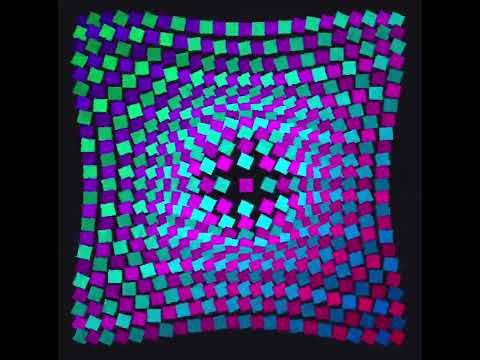
The project creates animated grids of geometric shapes where each shape can be:
- Multiple shape types including squares, circles, triangles, hexagons, pentagons, stars, diamonds, ring and fractal Koch snowflakes
- Geometrically distorted using 20 mathematical functions (sine waves, Perlin noise, circular patterns, spiral warps, lens effects, moiré patterns, etc.)
- Dynamically colored using 20 schemes (rainbow, gradient, neon, cyberpunk, thermal, vaporwave, etc.)
- Dynamically resized with variable grid densities from 8×8 to 256×256 cells
- Interactively controlled through comprehensive keyboard shortcuts and real-time parameter adjustment
- Mixed or uniform shape distribution across the grid
- Saved and loaded as complete scene configurations with all parameters preserved
- Recorded as GIFs for sharing animated sequences
The core architecture follows a modular design with clear separation of concerns:
- Grid Generation: Creates a regular NxN grid of geometric shapes with base positions and dynamic density control
- Shape System: Supports 8 different shape types with unified rendering architecture
- Distortion Engine: Applies mathematical transformations to deform shape positions and orientations
- Color System: Generates dynamic colors based on position, time, and color animation input
- Scene Management: Complete parameter serialization/deserialization with YAML persistence
- Media Export: Real-time GIF recording and PNG screenshot capabilities
- Status Monitoring: Live parameter display and interactive help system
- Rendering: Real-time pygame-based visualization with 60fps target
The distortions are based on several mathematical approaches:
- Sine Wave Distortions:
sin(x * frequency + phase) * amplitude - Perlin Noise: Smooth, organic-looking deformations
- Circular Distortions: Radial distortions from center points
- Swirl Distortions: Rotational vortex effects around the canvas center
- Ripple Distortions: Concentric waves with tangential displacement
- Flow Distortions: Curl-noise vector fields for organic movement
- Random Static: Controlled randomness for chaotic effects
Global Principle: A distortion function is a mathematical transformation that takes static grid positions and creates smooth, organic movement by calculating new positions and rotations for each element over time.
Input Parameters:
base_pos- Original static position (x, y) of a grid elementparams- Unique parameters per cell (phase offsets, frequencies) for varietycell_size- Grid cell size for appropriate movement scalingdistortion_strength- Global intensity multiplier (0.0 = no effect, 1.0 = full effect)time- Current animation time (key ingredient for smooth motion)canvas_size- Canvas dimensions for center-based effects
Output: (new_x, new_y, rotation) - The displaced position and rotation angle where the element should be drawn.
Animation Mechanics: The system runs at 60 FPS, meaning every square is recalculated and redrawn 60 times per second. Small time increments combined with continuous mathematical functions (sine, cosine, etc.) create the illusion of fluid movement. Each frame, the time parameter increases slightly, producing smooth positional changes that your eye perceives as organic motion rather than discrete jumps.
distorsion_movement/
├── __init__.py              # Package entry point & public API
├── deformed_grid.py         # Main DeformedGrid class with scene management
├── enums.py                 # Type definitions (DistortionType, ColorScheme, ShapeType)
├── shapes.py                # Shape rendering system
├── colors.py                # Color generation algorithms
├── distortions.py           # Geometric distortion algorithms
├── demos.py                 # Demo functions & usage examples
├── tests/                   # Comprehensive unit tests
│   ├── test_shapes.py       # Shape rendering tests
│   ├── test_enums.py        # Enum validation tests
│   ├── test_deformed_grid.py # Grid functionality tests
│   └── ...                  # Other test modules
└── images/                  # Generated PNG screenshots
└── saved_params/            # Scene configuration YAML files
└── gifs/                    # Generated GIF animations
- Main
DeformedGridclass that orchestrates everything - Pygame rendering loop and event handling
- Grid generation and position calculations with dynamic density control
- Shape type management and rendering coordination
- Animation timing and state management
- Fullscreen/windowed mode switching
- Interactive controls (keyboard shortcuts, shape cycling, parameter adjustment)
- Scene management (save/load YAML configurations)
- Status display and interactive help system
- GIF recording and media export
- Real-time grid density adjustment (8×8 to 256×256)
- Unified rendering architecture for 12 geometric shapes
- Rotation and scaling support for all shape types
- Mathematically precise shape generation (triangles, hexagons, stars, etc.)
- Consistent interface with fallback error handling
- Optimized drawing functions using pygame primitives
- 20 different color schemes (monochrome, gradient, rainbow, neon, cyberpunk, vaporwave, etc.)
- Position-based color calculations
- Time-based color animations
- HSV/RGB color space conversions
- 20 distortion algorithms (random, sine, Perlin, circular, swirl, ripple, flow, tornado, lens, moiré, etc.)
- Mathematical transformation functions
- Parameter generation for each square
- Time-based animation calculations
- Pre-configured demonstration functions
- Shape-specific demos (stars, hexagons, triangles, etc.)
- Mixed vs single shape mode examples
- Simple API for quick setup
- Command-line interface with multiple demo options
DistortionType: RANDOM, SINE, PERLIN, CIRCULAR, SWIRL, RIPPLE, FLOW, PULSE, CHECKERBOARD, CHECKERBOARD_DIAGONAL, TORNADO, SPIRAL, SHEAR, LENS, SPIRAL_WAVE, NOISE_ROTATION, CURL_WARP, FRACTAL_NOISE, MOIRE, KALEIDOSCOPE_TWISTColorScheme: MONOCHROME, BLACK_WHITE_RADIAL, BLACK_WHITE_ALTERNATING, GRADIENT, RAINBOW, COMPLEMENTARY, PASTEL, NEON, ANALOGOUS, CYBERPUNK, AURORA_BOREALIS, INFRARED_THERMAL, DUOTONE_ACCENT, DESERT, METALLICS, REGGAE, SUNSET, POP_ART, VAPORWAVE, CANDY_SHOPShapeType: SQUARE, CIRCLE, TRIANGLE, HEXAGON, PENTAGON, STAR, DIAMOND, KOCH_SNOWFLAKE, RING, YIN_YANG, LEAF, ELLIPSIS
from distorsion_movement import quick_demo

# Launch with default settings
quick_demo()from distorsion_movement import DeformedGrid, DistortionType, ColorScheme, ShapeType
# Create custom grid with shapes
grid = DeformedGrid(
dimension=64, # 64x64 grid
cell_size=12, # 12px shapes
distortion_strength=0.7, # 70% distortion
distortion_fn=DistortionType.SINE.value, # Sine wave distortion
color_scheme=ColorScheme.NEON.value, # Neon colors
shape_type=ShapeType.STAR.value, # Star shapes
mixed_shapes=False, # Single shape type
color_animation=True # Animate colors
)
grid.run_interactive()| Key | Action |
|---|---|
ESC |
Exit application |
F |
Toggle fullscreen/windowed mode |
I or TAB |
Show/hide interactive help menu |
D |
Show/hide status display |
| Key | Action |
|---|---|
SPACE / Shift+SPACE |
Next/previous distortion type |
+/- |
Increase/decrease distortion intensity |
R |
Regenerate random parameters |
| Key | Action |
|---|---|
T then +/- |
NEW: Adjust grid density (number of cells) |
| Key | Action |
|---|---|
C / Shift+C |
Next/previous color scheme |
A |
Toggle color animation on/off |
| Key | Action |
|---|---|
H / Shift+H |
Next/previous shape type |
Ctrl+H |
Toggle mixed shapes mode |
| Key | Action |
|---|---|
S |
NEW: Save current image (PNG + parameters YAML) |
G |
NEW: Start/stop GIF recording |
| Key | Action |
|---|---|
L / Shift+L |
NEW: Load next/previous saved scene |
P |
NEW: Refresh saved scenes list |
- Square: Classic rectangular shapes (original)
- Circle: Perfect circular forms
- Triangle: Equilateral triangular shapes
- Hexagon: Six-sided geometric patterns
- Pentagon: Five-sided polygonal forms
- Star: Five-pointed star shapes
- Diamond: Rotated square formations
- Koch Snowflake: Fractal snowflake patterns with recursive geometry
- Ring: Hollow circle shapes with variable thickness
- Yin Yang: Yin-Yang symbol with dynamic color transitions
- Leaf: Two mirrored arcs meeting at sharp tips
- Ellipsis: A stretched circle with rotation
- Single Shape: All cells use the same shape type (uniform grid)
- Mixed Shapes: Random variety of shapes across the grid (dynamic variety)
- Random: Static chaotic displacement
- Sine: Smooth wave-based deformations
- Perlin: Organic, noise-based distortions
- Circular: Radial distortions from center
- Swirl: Rotational vortex effects with periodic waves
- Ripple: Concentric wave patterns with tangential movement
- Flow: Smooth curl-noise vector fields for organic flow
- Pulse: Rhythmic radial breathing with wave-like pulsations
- Checkerboard: Alternating directional movement in grid pattern
- Checkerboard Diagonal: Diagonal tug-of-war between neighboring cells
- Tornado: Swirling vortex with increased rotation near center
- Spiral: Galaxy-like spiral motion with radius oscillation
- Shear: Horizontal/vertical skewing with wave propagation
- Lens: Dynamic magnification effect with moving focus point
- Spiral Wave: Combined circular ripples with rotational motion
- Noise Rotation: Positions stable, rotation driven by smooth noise field
- Curl Warp: Divergence-free swirling vector fields
- Fractal Noise: Multi-octave organic terrain-like distortions
- Moiré: Interference patterns from overlapping wave frequencies
- Kaleidoscope Twist: Radial symmetry with mirrored sectors and melting
- Monochrome: Single color variations
- Black White Radial: Center-to-edge black and white distribution
- Black White Alternating: Classic checkerboard pattern
- Gradient: Smooth diagonal color transitions
- Rainbow: Full spectrum cycling
- Complementary: Alternating opposite colors
- Pastel: Soft, muted tones
- Neon: Bright, electric colors
- Analogous: Harmonious neighboring hues with subtle variations
- Cyberpunk: Neon magenta and cyan with deep purple accents
- Aurora Borealis: Flowing teal, green, and purple like northern lights
- Infrared Thermal: Classic thermal imaging progression (blue→cyan→green→yellow→orange→red→white)
- Duotone Accent: Two main colors with rare bright yellow accent pops
- Desert: Sandy beige, warm orange, and muted brown tones
- Metallics: Smooth blends between gold, silver, and bronze
- Reggae: Green, yellow, and red in radial distribution
- Sunset: Warm gradient from yellow through orange and pink to purple
- Pop Art: Bright primary colors with bold black/white outlines
- Vaporwave: Soft pastel neons in lavender, cyan, peach, and pink
- Candy Shop: Sweet bubblegum pink, mint green, and lemon yellow
Install with:
pip install -r requirements.txtCore dependencies include:
pygame- Real-time graphics and event handlingnumpy- Numerical computations and array processingimageio- GIF animation exportPyYAML- Scene parameter serializationpytest- Testing framework
Run the comprehensive test suite:
# Run all tests
python -m pytest distorsion_movement/tests/ -v

# Run specific test modules
python -m pytest distorsion_movement/tests/test_shapes.py -v      # Shape rendering tests
python -m pytest distorsion_movement/tests/test_enums.py -v       # Enum validation tests
python -m pytest distorsion_movement/tests/test_deformed_grid.py -v # Grid functionality tests

# Test coverage includes:
# - Shape rendering and rotation
# - Grid generation and management
# - Color schemes and animations
# - Distortion algorithms
# - Integration testingThe project has an extensive roadmap for future enhancements (see TODO.md):
✅ Real-time Performance: 60fps rendering with thousands of shapes
✅ Multiple Shape Types: 12 geometric shapes (squares, circles, triangles, hexagons, pentagons, stars, diamonds, Koch snowflakes, ring, yin yang, leaf, ellipsis)
✅ Flexible Shape Modes: Single shape or mixed shape grids
✅ Dynamic Grid Density: Live adjustment of cell count and size (8×8 to 256×256)
✅ Comprehensive Status Display: Real-time parameter monitoring overlay
✅ Scene Management: Save/load visual configurations with YAML parameters
✅ Media Export: PNG screenshots and GIF animation recording
✅ Interactive Help System: Built-in keyboard shortcut reference
✅ Modular Architecture: Clean separation of concerns, easily extensible
✅ Interactive Controls: Live parameter adjustment and shape cycling
✅ Rich Visual Combinations: 12 shapes × 20 distortions × 20 colors × 10 variable grid sizes = 48,000+ combinations
✅ Cross-platform: Works on Windows, macOS, Linux
✅ Comprehensive Testing: Full unit test coverage
✅ Fullscreen Support: Immersive viewing experience
The project is designed for easy extension:
- Add new distortion algorithms in
distortions.py - Add the new distortion type to
DistortionTypeenum inenums.py
To add a new shape type, you need to:
- Add the shape to the enum: Add your new shape to
ShapeTypeenum inenums.py - Create the shape file: Create a new file
shapes/your_shape.pywith:- A class inheriting from
BaseShape - A static
draw()method with signature:(surface, x, y, rotation, size, color, **kwargs) - Import the base class:
from .base_shape import BaseShape
- A class inheriting from
- Update the package: Add your shape to
shapes/__init__.py:- Import:
from .your_shape import YourShape - Add to
SHAPE_REGISTRY:"your_shape": YourShape.draw - Add to
__all__list:'YourShape'
- Import:
To add a new color scheme, you need to:
- Add the scheme to the enum: Add your new color scheme to
ColorSchemeenum inenums.py - Create the color scheme file: Create a new file
colors/your_scheme.pywith:- A class inheriting from
BaseColor - A static
get_color_for_position()method with signature:(square_color, x_norm, y_norm, distance_to_center, index, dimension) -> Tuple[int, int, int] - Import the base class:
from .base_color import BaseColor - Use helper methods like
_clamp_rgb(),_blend_colors(),_hsv_to_rgb_clamped()for color operations
- A class inheriting from
- Update the package: Add your color scheme to
colors/__init__.py:- Import:
from .your_scheme import YourScheme - Add to
COLOR_SCHEME_REGISTRY:"your_scheme": YourScheme.get_color_for_position - Add to
__all__list:'YourScheme'
- Import:
Distorsion Movement transforms mathematical concepts into living, breathing art that responds to user interaction. With support for multiple geometric shapes, flexible rendering modes, and comprehensive interactive controls, it's both a technical showcase of real-time graphics programming and a creative tool for generating endless visual experiences.