Important
I'm in the process of rewriting this project from Python to TypeScript. It is not published on any registry yet, and NOT READY FOR USE.
An integration test and automation library for Telegram Bots based on mtcute. Written in TypeScript.
Test your bot in realtime scenarios!
Are you a user of tgintegration? I'm actively looking for feedback and ways to improve the library, come and let me know in the official group!



Features • Prerequisites • Installation • Quick Start Guide • Test Frameworks
- 📖 Documentation
- 👥 Telegram Chat
- 📄 Free software: MIT License
- 👤 Log into a Telegram user account and interact with bots or other users
- ✅ Write realtime integration tests to ensure that your bot works as expected!
▶️ Bun Test examples - ⚡️ Automate any interaction on Telegram!
▶️ Automatically play @IdleTownBot - 🛡 Fully typed
- 🚀 Runtime agnostic - Works with Bun, Node.js, and Deno
- 📦 ES modules only - Modern ESM JavaScript ecosystem
- 🧪 Built with high test coverage and modern tooling
- A Telegram API key.
- A signed in mtcute Telegram Client
- Node.js 18+, Bun 1.0+, or Deno 1.40+
- TypeScript 5.0+ (recommended)
bun add @tgintegration/core @tgintegration/bunnpm add @tgintegration/core @tgintegration/nodedeno add jsr:@tgintegration/corenpx jsr add @tgintegration/coreYou can follow along by running the example (README)
Suppose we want to write integration tests for @BotListBot by sending it a couple of messages and checking that it responds the way it should.
After configuring an mtcute user client,
let's start by creating a ChatController:
import { ChatController } from "@tgintegration/core";
import { TelegramClient } from "@mtcute/bun";

const client = new TelegramClient({
  apiId: 12345, // Your API ID
  apiHash: "abc123", // Your API hash
  storage: "session.db",
});

const controller = new ChatController(client, "@BotListBot", {
  maxWait: 8000, // Maximum timeout for responses (optional)
  globalActionDelay: 2500, // Delay between actions for observation (optional)
});

await controller.initialize();
await controller.clearChat(); // Start with a blank screen (⚠️)
Now, let's send /start to the bot and wait until exactly three messages have been received by using the collect method with a callback:
const response = await controller.collect(
  {
    numMessages: 3,
    maxWait: 8000,
  },
  async () => {
    await controller.sendCommand("start");
  }
);

console.log(`Received ${response.count} messages`);
console.log("First message is a sticker:", response.messages[0].media?.type === "sticker");
The result should look like this:
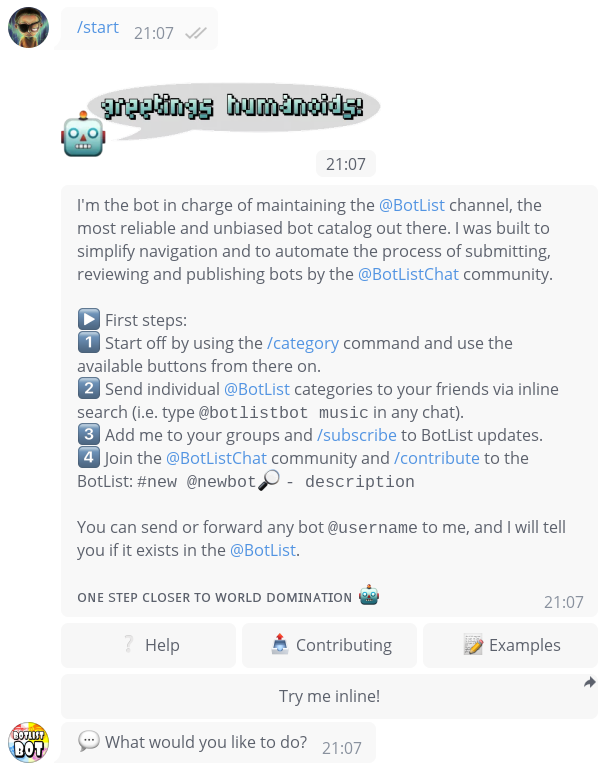
Examining the buttons in the response...
// Get the inline keyboard and examine its buttons
const inlineKeyboard = response.inlineKeyboards[0];
console.log("Three buttons in the first row:", inlineKeyboard.buttons[0].length === 3);
We can also press the inline keyboard buttons, for example based on a regular expression:
const examples = await inlineKeyboard.click(/.*Examples/);As the bot edits the message, .click() automatically listens for "message edited" updates and returns
the new state as another Response.
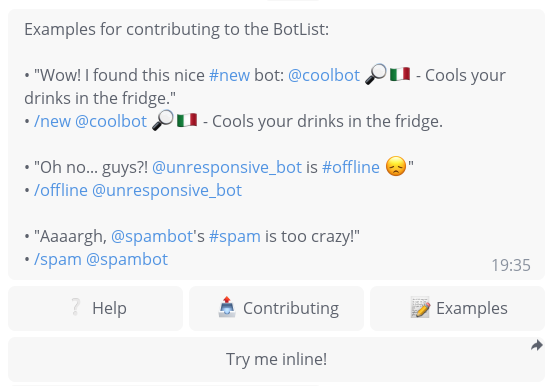
console.log("Found examples text:", examples.fullText.includes("Examples for contributing to the BotList"));So what happens when we send an invalid query or the peer fails to respond?
The following instruction will raise an InvalidResponseError after maxWait seconds.
This is because we passed throwOnTimeout: true in the collect options.
import { InvalidResponseError } from "@tgintegration/core";

try {
  await controller.collect(
    {
      maxWait: 8000,
      throwOnTimeout: true,
    },
    async () => {
      await controller.sendCommand("ayylmao");
    }
  );
} catch (e) {
  if (e instanceof InvalidResponseError) {
    console.log("Expected timeout occurred");
  }
}
Let's explicitly set throwOnTimeout to false so that no exception occurs:
const noReplyResponse = await controller.collect(
  {
    maxWait: 3000,
    throwOnTimeout: false,
  },
  async () => {
    await controller.client.sendText(controller.peer, "Henlo Fren");
  }
);

if (noReplyResponse.isEmpty) {
  console.log("No response received as expected");
}Bun Test is the recommended test framework for use with tgintegration. You can browse through several examples and tgintegration also uses Bun Test for its own test suite.
import { test, expect } from "bun:test";
import { ChatController } from "@tgintegration/core";

test("bot should respond to /start", async () => {
  const controller = new ChatController(client, "@MyBot");
  await controller.initialize();

  const response = await controller.collect(
    { minMessages: 1 },
    async () => await controller.sendCommand("start")
  );

  expect(response.count).toBeGreaterThan(0);
});tgintegration is runner-agnostic and works perfectly with Node.js's built-in test runner:
import { test } from "node:test";
import { strict as assert } from "node:assert";
import { ChatController } from "@tgintegration/core";

test("bot should respond to /start", async () => {
  const controller = new ChatController(client, "@MyBot");
  await controller.initialize();

  const response = await controller.collect(
    { minMessages: 1 },
    async () => await controller.sendCommand("start")
  );

  assert(response.count > 0);
});
Deno users can enjoy the same seamless experience:
import { test } from "deno:test";
import { assertEquals } from "std/assert";
import { ChatController } from "@tgintegration/core";

test("bot should respond to /start", async () => {
  const controller = new ChatController(client, "@MyBot");
  await controller.initialize();

  const response = await controller.collect(
    { minMessages: 1 },
    async () => await controller.sendCommand("start")
  );

  assertEquals(response.count > 0, true);
});tgintegration follows a monorepo structure with platform-specific packages:
@tgintegration/core- Main library logic (platform agnostic)@tgintegration/bun- Bun-specific optimizations and entry point@tgintegration/node- Node.js compatibility layer@tgintegration/deno- Deno compatibility and JSR publishing