- Write SQLAlchemy migrations.
- Connect between tables using SQLAlchemy relationships.
- Use SQLAlchemy to run CRUD statements in the database.
- Schema: the blueprint of a database. Describes how data relates to other data in tables, columns, and relationships between them.
- Persist: save a schema in a database.
- Engine: a Python object that translates SQL to Python and vice-versa.
- Session: a Python object that uses an engine to allow us to programmatically interact with a database.
- Transaction: a strategy for executing database statements such that the group succeeds or fails as a unit.
- Migration: the process of moving data from one or more databases to one or more target databases.
The Flatiron Theater Company is holding auditions!
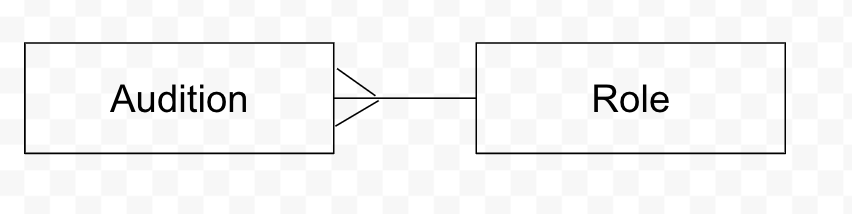
An actor may only Audition for one Role, while a Role may have many
Auditions for it!
Run pipenv install; pipenv shell
Create your migrations.
Auditionsshould have an actor (string), location (string) and belong_to a role (integer).Rolesshould only have a character_name.
| Column | Type |
|---|---|
| actor | string |
| location | string |
| phone | integer |
| hired | boolean |
| role_id | integer |
| Column | Type |
|---|---|
| character_name | string |
- What relationships will this need (i.e. one-to-one, one-to-many, and many-to-many)?
Audition.rolereturns an instance of role associated with this audition.Audition.call_back()will change the the hired attribute toTrue.
Role.auditionsreturns all of the auditions associated with this role.Role.actorsreturns a list of names from the actors associated with this role.Role.locationsreturns a list of locations from the auditions associated with this role.Role.lead()returns the first instance of the audition that was hired for this role or returns a string 'no actor has been hired for this role'.Role.understudy()returns the second instance of the audition that was hired for this role or returns a string 'no actor has been hired for understudy for this role'.