Ms.Word Text Finder is a Python program that allows you to search for and extract specific text from a Microsoft Word document (.docx).
Simply open the file and enter a search term to search for within the document. If the term is found, the program will print the paragraph containing the term and allow you to specify points within the paragraph to extract a portion of the text. The extracted text can be saved as a variable and written to a text file. It can replace variables in a Word Document or even converted the Word Template to a PDF file.
git clone https://github.com/beephole/Ms.Word-Text-Finder.git
cd Ms.Word-Text-Finder
pip install -r requirements.txt
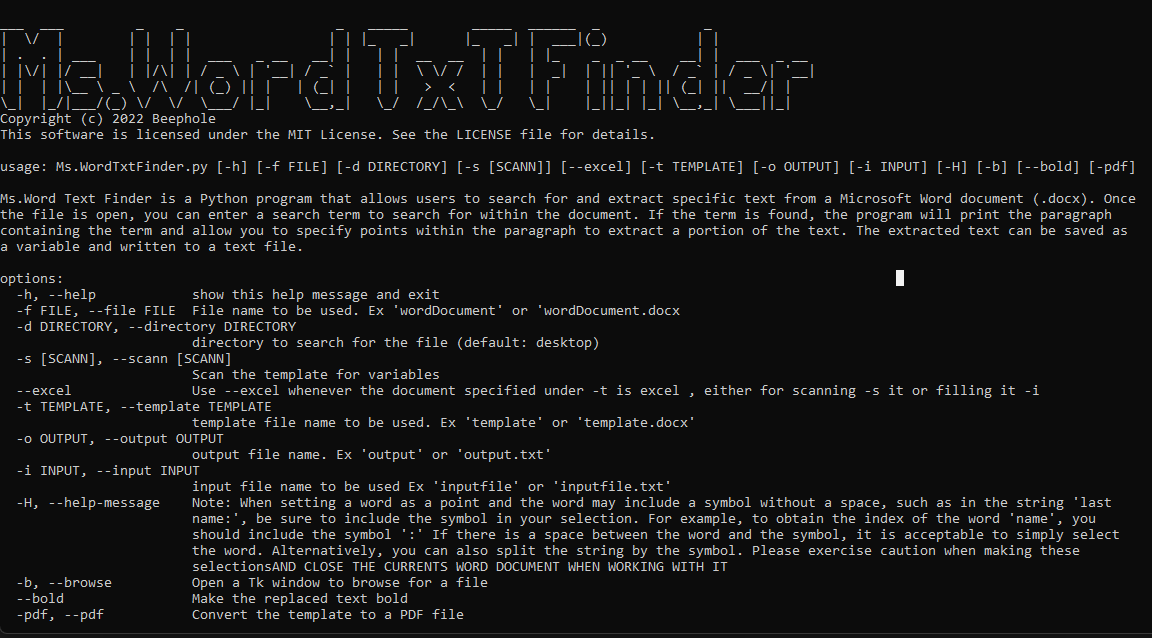
Ms.WordTxtFinder.py [-h] [-f FILE] [-d DIRECTORY] [-t TEMPLATE] [-o OUTPUT] [-H] [-b] [-i INPUT] [--bold] [ -s SCANN] [-pdf]
To extract text from the file 'wordDocument.docx' and save it to a text file called 'output.txt':
python Ms.WordTxtFinder.py -f wordDocument.docx -o output.txt
To extract text from the file 'wordDocument.docx' and save it to'output.txt' and replace Variables at WordTemplate:
python Ms.WordTxtFinder.py -f wordDocument.docx -t template -o output.txt
To open a OS Window to get the file PATh ,search for text and save it to a text file called 'output.txt':
python Ms.WordTxtFinder.py -b -o output.txt
To extract text from the file 'wordDocument.docx' replace the Variables and also convertin to PDF':
python Ms.WordTxtFinder.py -f wordDocument.docx -t wordTemplate -pdf
To pass a file with Keys and Values to a word Template and convertin to PDF':
python Ms.WordTxtFinder.py -i inputfile.txt -t wordTemplate -pdf
To scann a word Template and Output the result for later use':
python Ms.WordTxtFinder.py -s -t template.docx -o output.txt
To import a list of values to replace a Excel template and make the variables bold':
python Ms.WordTxtFinder.py -i results.txt -t exeltemplate --excel --bold
To scann a excel Template and Output the result for later use':
python Ms.WordTxtFinder.py -s -t exeltemplate -o output.txt --excel
- Search for specific terms within a Microsoft Word document
- Extract a portion of text from a paragraph
- Save extracted text to a text file or Replace text with Word Template
- Option to browse for a file using a Tk window
- Customize the output file
- Converts a Word Template into a PDF
- Input list of variables and values and does the swaping and PDF converting
- Scann a Word Template for all variables and outputs them in a .txt
- It can go through tables in a word Doc and replace the Text.
- Option to make the Values Bold text.
- Scan Excel templates for variables for later use and replace variable also with -i input.txt with values in
Copyright (c) 2022 Beephole. This software is licensed under the MIT License. See the LICENSE file for details.
We welcome contributions to Ms.Word Text Finder! If you have an idea for a new feature or have found a bug, please open an issue or submit a pull request.
- Everything is saved in the working or current Directory.
- If -d flag is not included then the PATH of files is going to be Desktop.
- MAKE SURE WHEN USING FLAGS TO TYPE THE FILE NAMES CORRECTLY .
- MAKE SURE TO CLOSE THE WORD DOCUMENT THAT YOU ARE TRYING TO USE WITH THE TOOL
"I’m always doing things I can’t do. That’s how I get to do them. 👍"
btc: 137L6AWxzsJ5eqsptGZx2yEfuznR9qntk3