
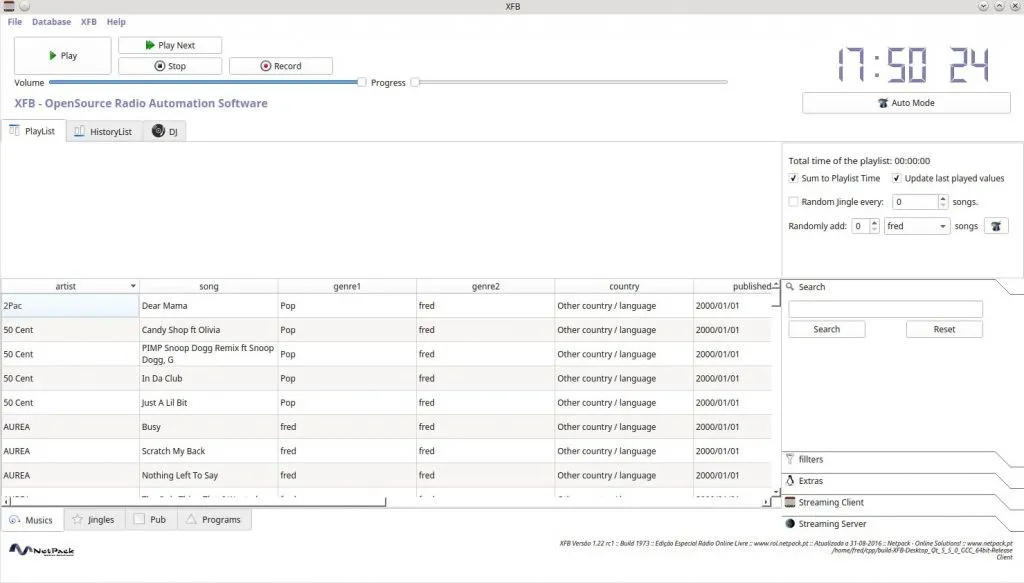
The Open-Source Solution for Professional Radio Broadcasting, now rebuilt with Qt6.



XFB is an open-source radio automation software developed by Frédéric Bogaerts at Netpack Online Solutions.
XFB is designed to automate radio station operations, providing comprehensive management of various assets. With its intuitive interface and powerful features, XFB simplifies the entire broadcasting process.
- 📊 Database Management: A robust system for cataloging and organizing music, jingles, advertisements, programs, and more.
- 🔄 Automated Scheduling: Easily create and manage schedules for music playback, advertisement slots, and program airing.
- ⚙️ Customizable Workflow: Tailor XFB to fit your station's unique needs with customizable settings and configurations.
- 🌐 Remote Access (beta): Access and control XFB remotely, allowing for convenient management from anywhere with an internet connection.
The easiest way to install XFB is by using a pre-built package for your operating system.
| Operating System | Download / Source | Installation Command |
|---|---|---|
| 🍏 macOS (Intel/Apple Silicon) | GitHub Releases (Download the .dmg file) |
Drag XFB.app to your Applications folder. |
| 🐧 Debian / Ubuntu (amd64) | GitHub Releases (Download the .deb file) |
sudo apt install ./xfb_*.deb |
| 🐧 Arch Linux (Manjaro, etc.) | AUR (Arch User Repository) | yay -S xfb or paru -S xfb |
If you're new to the AUR on Arch Linux, here are the detailed steps.
- Open your package manager GUI (e.g.,
pamac-manager). - Navigate to the settings, find the "Third Party" or "AUR" tab, and ensure it's enabled.
- Search for
xfband click "Install".
- If you don't have an AUR helper like
yay, install it first:sudo pacman -S --needed git base-devel git clone https://aur.archlinux.org/yay.git cd yay makepkg -si - Install XFB using
yay:yay -S xfb
🛠️ Building from Source (for Developers)
If you prefer to compile the application yourself, follow these instructions.
- A C++ compiler (g++, clang)
- Git
- Qt6 Development Libraries
- Install dependencies:
sudo apt update
sudo apt install build-essential qt6-base-dev qt6-multimedia-dev git
- Clone and build:
git clone https://github.com/netpack/XFB.git
cd XFB/src
mkdir build && cd build
qmake6 ../XFB.pro
make -j$(nproc)
- Run:
./XFB
- Install dependencies:
sudo pacman -S --needed git base-devel qt6-base qt6-multimedia
- Clone and build using
makepkg:git clone https://aur.archlinux.org/xfb.git # Or your own repo clone cd xfb makepkg -si
For full functionality, you may want to install these helpful tools:
- Audacity: For advanced audio editing.
- yt-dlp: For downloading media from various online sources.
For support or inquiries, please open an issue on GitHub.
Contributions to the project are welcome! Please feel free to fork the repository and submit a pull request.
XFB is licensed under the GNU General Public License v3.0.
This program is free software and is distributed in the hope that it will be useful, but WITHOUT ANY WARRANTY. See the LICENSE file for the full text.
🎶 Have fun,
👨💻 Frédéric Bogaerts