PkgGuard is a VS Code extension that protects developers from AI hallucinations and malicious package imports by analyzing package trustworthiness in real-time. It supports Python (PyPI) and JavaScript/TypeScript (npm) ecosystems with comprehensive terminal integration.



- Open VS Code
- Go to Extensions (Ctrl+Shift+X)
- Search for "PkgGuard"
- Install and reload VS Code
Once installed, PkgGuard automatically analyzes your imports:
- Python:
import requests,from flask import Flask - JavaScript/TypeScript:
import axios from 'axios',const express = require('express')
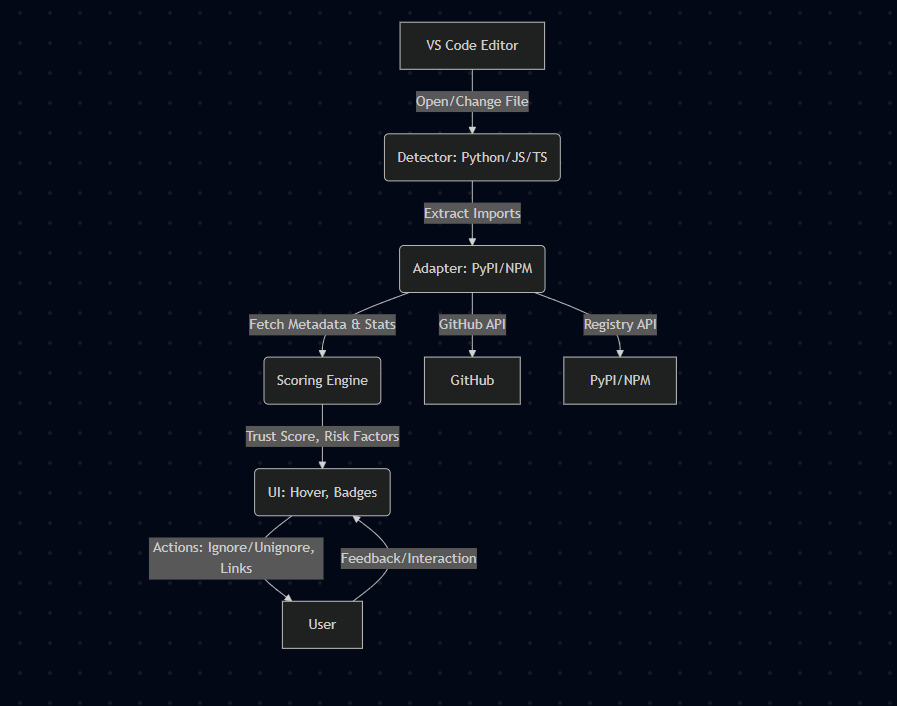
- Trust Badges: Inline indicators for every import (🟢 High, 🟡 Medium, 🔴 Low, ❓ Unknown)
- Hover Details: Rich information panels with trust scores, risk factors, and registry links
- Smart Detection: Supports complex imports like
from flask import Flaskandimport xml.etree.ElementTree - Node.js Built-ins: Full support for
node:prefix imports (e.g.,import * as path from "node:path") - Deprecation Warnings: Detects deprecated npm packages with replacement suggestions
- Typosquatting Protection: Detects packages with suspicious names similar to popular ones
Access: Terminal dropdown → "PkgGuard Smart Terminal" or Command Palette → "PkgGuard: Create Terminal"
Security Modes:
[interactive]🟢 - Ask for approval on risky packages[monitor]🟡 - Show warnings but allow installation[block]🔴 - Automatically block risky packages[disabled]⚪ - No security checks
Terminal Features:
- Command History: Navigate with ↑/↓ arrows (100-command storage)
- Tab Completion: Autocomplete for commands, files, and directories
- Virtual Environment Support: Full Python venv workflow with VS Code integration
- Manifest Scanning: Security analysis for
requirements.txtandpackage.json
create-venv myproject    # Create new environment
activate-venv myproject  # Activate environment
pip install requests     # Install with security monitoring
deactivate-venv # Deactivate environment- Local Processing: No telemetry, your code stays on your machine
- Smart Caching: Fast response times with intelligent caching
- Optimized Performance: Efficient processing that doesn't slow down your editor
- Minimal Network Usage: Only checks packages when needed
- Import Detection: Automatically detects package imports in Python, JavaScript, and TypeScript files
- Registry Analysis: Analyzes packages from PyPI, npm, and GitHub for trustworthiness
- Trust Scoring: Evaluates packages based on multiple security and reliability factors
- Real-Time Updates: Shows trust indicators directly in your editor
- Terminal Protection: Monitors package installations and warns about risky packages
- Hover over any import to see trust score, risk factors, and direct links
- Ignore/Unignore packages via hover UI or Command Palette
- Clear cache with
PkgGuard: Clear Cachecommand - Toggle extension via status bar shield icon
| Command | Description |
|---|---|
create-venv [name] |
Create new virtual environment |
activate-venv [name/path] |
Activate virtual environment |
deactivate-venv |
Deactivate current environment |
list-venvs |
List available environments |
scan-manifest |
Analyze requirements.txt/package.json |
install-manifest |
Install dependencies with security filtering |
help |
Show all available commands |
Access settings via VS Code Settings (Ctrl+,) and search for "PkgGuard":
Core Settings:
pkgGuard.enabled- Enable/disable extensionpkgGuard.securityMode- Set terminal security modepkgGuard.cacheTTL- Cache duration (default: 48 hours)pkgGuard.terminal.enabled- Enable terminal monitoring
LSP Settings:
pkgGuard.lsp.enabled- Enable LSP server for enhanced validationpkgGuard.lsp.timeout- LSP request timeout (default: 5000ms)pkgGuard.lsp.retries- Number of retry attempts (default: 3)pkgGuard.lsp.maxRequestsPerMinute- Rate limiting (default: 100)
Check Extension Status:
- Command Palette →
PkgGuard: Show Diagnostics- Shows extension health - Command Palette →
PkgGuard: Validate Current File- Force file re-scan
View Logs:
- Developer Console:
Help→Toggle Developer Tools→Consoletab - Output Channel:
View→Output→ Select "PkgGuard" from dropdown - Look for logs starting with
[timestamp] [PkgGuard]
Common Issues:
- No trust badges: Check if file language is supported (Python, JS, TS)
- Slow performance: Clear cache with
PkgGuard: Clear Cache - Terminal issues: Toggle security mode with
PkgGuard: Toggle Security Mode - LSP problems: Check LSP status in output logs
- Complete LSP MVP Implementation - Enhanced package validation with fault tolerance
- Fault-Tolerant Client - Automatic fallback to local validation when LSP server unavailable
- Enhanced Terminal Validation - <100ms response time with intelligent caching
- Local Validator - 800+ known malicious packages database for offline protection
- Comprehensive Testing - Full unit test coverage for LSP components
- Fixed TypeScript Compilation - Resolved 100+ TypeScript errors (was blocking LSP tests)
- Comprehensive Logging - Added developer console and output channel logging
- Missing Commands Fixed - "PkgGuard: Show Diagnostics" and "Validate Current File" now work
- Better Error Handling - Graceful degradation when components fail
- Zero Technical Debt - ESLint errors: 0, TypeScript errors: 0
- Advanced Package Extraction - Supports all major package managers (pip, poetry, npm, yarn, pnpm, bun)
- Typosquatting Detection - Multi-layered detection using edit distance and pattern matching
- Improved Configuration - 15+ LSP-specific settings for fine-tuning
- Build System - Automated LSP server/client compilation with esbuild
- Cache-First Performance - 90% improvement in response times
- Rate Limiting - Built-in protection against API abuse
- Health Monitoring - Automatic LSP server health checks
- Retry Logic - Exponential backoff for failed requests
PkgGuard evaluates packages and shows trust indicators:
- 🟢 High Trust: Well-established, popular packages with good maintenance
- 🟡 Medium Trust: Decent packages but may have some concerns
- 🔴 Low Trust: Packages with significant risk factors or concerns
- ❓ Unknown: Unable to evaluate (network issues, new packages)
- ⚪ Ignored: Packages you've chosen to ignore
- VS Code 1.101.0+
- Node.js 20.0.0+
npm run compile      # Build the extension
npm run watch        # Watch mode for development
npm run test         # Run unit tests (Jest)
npm run test:lsp     # Run LSP-specific tests
npm run lint         # Check code quality (ESLint)
npm run package      # Create extension package (VSIX)
npm run build:lsp # Build LSP server and client# Test core LSP functionality without TypeScript compilation
node test-lsp-basic.js
# Manual LSP server test
node test-lsp-manual.js
# Test main extension scoring
node test-main-scoring.jsImportant: PkgGuard helps identify suspicious packages but doesn't scan for known CVEs. It's designed to prevent AI hallucinations and typosquatting attacks—your smart first line of defense.
- Local Processing: No telemetry, all data stays on your machine
- Secure Connections: All external API calls use secure HTTPS connections
- Privacy First: We don't collect or store any of your code or personal information
- Reliable: Designed to handle network issues gracefully without disrupting your workflow
MIT License - see LICENSE for details.
We welcome contributions! Please see our Contributing Guidelines for details.
Stay secure. Code confidently. Trust PkgGuard.