Skyline is a high-performance computing (HPC) project focused on benchmarking and comparing different parallelization approaches (OpenMP, MPI, CUDA, Rust) for the Skyline problem.
It includes multiple implementations, input data generators, and a timer utility for performance measurement.
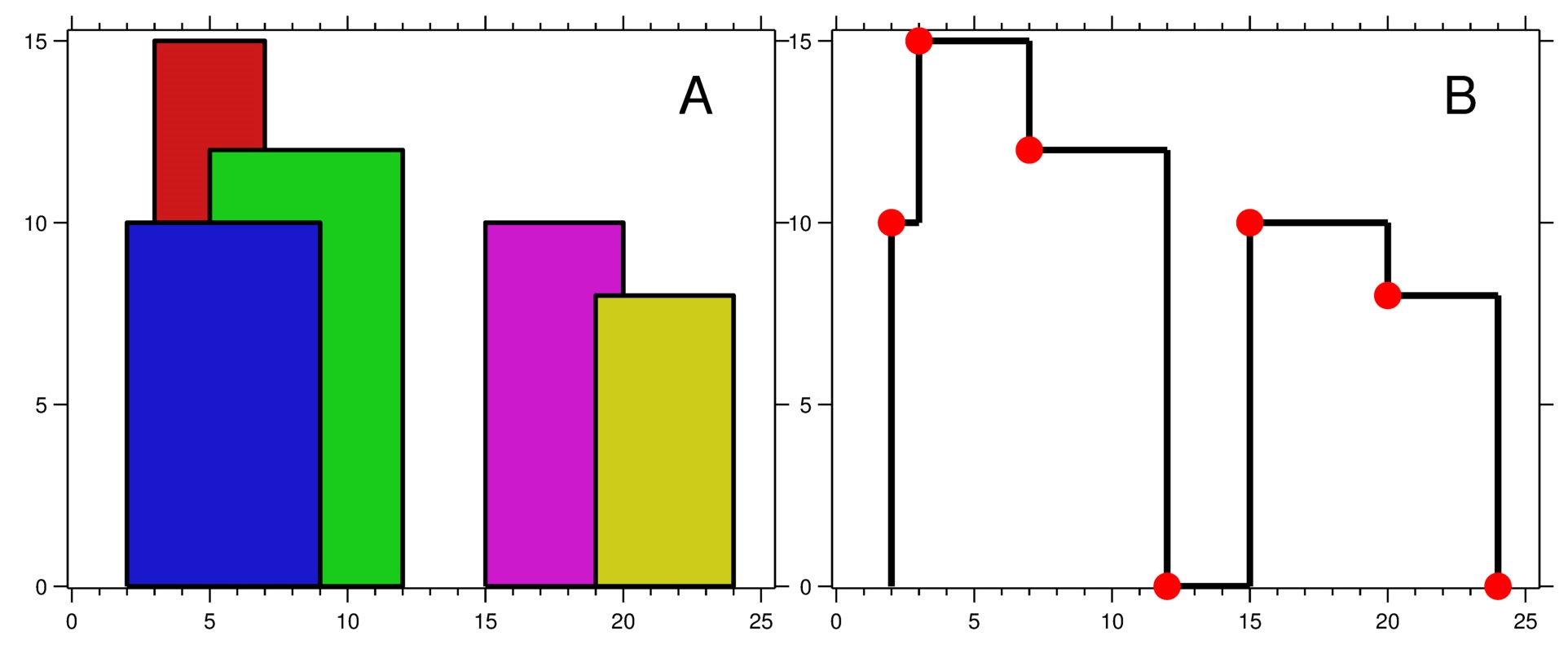
The Skyline problem is a fundamental computational geometry task.
Given a set of points in a multi-dimensional space, the goal is to find all points that are not dominated by any other point.
A point A dominates point B if A is as good or better than B in all dimensions and strictly better in at least one dimension.
Intuitively, the Skyline is the set of "best choices"—those that are not outperformed by any other option across all criteria.
For example, in a 2D space where each point represents a product with price and quality, the Skyline consists of products that are not both more expensive and lower quality than any other.
Note: If you want to run the CUDA implementation (
cudatarget), you must have the NVIDIA Docker runtime (nvidia-docker2) or the NVIDIA Container Toolkit installed, and your system must have a compatible NVIDIA GPU.
Standard Docker alone does not support GPU/CUDA workloads.
This project is completely dockerized. You do not need to install or uninstall any dependencies on your system.
All compilation and execution are handled inside a Docker container.
To build and run the project, simply use the provided script:
./skyline.sh [IMPLEMENTATION_TARGET] [DATAFILE_TARGET] [--silence|-s] [--verbose|-v]IMPLEMENTATION_TARGET: One of the Makefile's implementation targets (default: c-serial)DATAFILE_TARGET: One of the datafile targets (default: circle)--silenceor-s: If set, silences the output of the executable.--verboseor-v: If set, shows all Docker and Makefile logs.
What happens when you run the script:
- The Docker image is built with the requirements specified by your arguments.
- The container is run and executes the selected implementation on the chosen datafile.
- Output and timing information are displayed.
- All files created inside the container are automatically deleted after execution.
Example:
./skyline.sh rust-serial circleThe script will automatically build the Docker image, run the container, execute the selected target with the specified datafile target, and clean up after itself.
The following targets are available in the Makefile (use as [IMPLEMENTATION_TARGET]):
c-serial: Build and run the serial C implementationopenmp: Build and run the OpenMP implementationmpi: Build and run the MPI implementationcuda: Build and run the CUDA implementationrust-serial: Build and run the Rust serial implementationrust-parallel: Build and run the Rust parallel implementationall: Build all executables and prerequisitesclean: Remove build artifacts
The following datafile targets can be used (use as [DATAFILE_TARGET]):
circle: Small 2D circle (circle.in)test1: Surface of a 3D square (test1.in)test2: Surface of a 4D sphere (test2.in)test3: 10D diamond (test3.in)test4: 8D simplex (test4.in)test5: 20D sphere (test5.in)test6: 50D diamond (test6.in)test7: 200D diamond (test7.in)worst: Worst-case scenario (worst.in)
These correspond to targets in
./datafiles/Makefileand will generate.infiles for testing.
A Python script is provided to run all implementations on a selected datafile and visualize their execution times.
Script: plot_skyline_times.py
Usage:
python3 plot_skyline_times.py [--help|-h] [DATAFILE_TARGET]DATAFILE_TARGET: One of the valid datafile targets (default:circle).--helpor-h: Show help and list available datafile targets.
What it does:
- Runs
./skyline.sh all <DATAFILE_TARGET> --silenceto benchmark all implementations. - Parses the output for execution times.
- Plots a bar graph and saves it as
skyline_times.png.
Example:
python3 plot_skyline_times.py test3Dependencies:
You need matplotlib installed. Install it with:
pip3 install matplotlib./datafiles/: input datafile generators and files./src/: source code for all implementations./C/: C implementations (serial, OpenMP, MPI, CUDA)./rust/: Rust implementations (serial, parallel)./timer/: Timer utility
results/: output directory for generated plots and processed datafilesskyline.sh: BASH utility script for easy deployment and testingplot_skyline_times.py: Python script for plotting execution timesDockerfile: Container build fileMakefile: Top-level build fileREADME: This file
Feel free to open issues or submit pull requests for improvements or bug fixes.
gcsar
Skyline by gcsar is licensed under CC BY-NC-SA 4.0


